Thursday, July 23, 2026
Anchor Days at Work: Meaning, Examples, and Setup Checklist


An anchor day at work is a fixed day when a defined group plans to be in the same workplace together. Its job is to create predictable overlap for work that benefits from shared presence. An anchor day does not, by itself, decide how many days people must attend, which roles can work remotely, or how exceptions should work.
The useful question is not simply, “Which weekday should we choose?” It is, “Which people need reliable overlap, for what work, and how will we know the arrangement is helping?” The checklist and pilot scorecard below turn that question into a practical team decision.
What anchor days at work mean
The term has a clear operational meaning: a specified on-site day shared by a team, division, or organisation. Ireland’s Workplace Relations Commission code describes fixed on-site days as “anchor days” and gives weekly team days and weekly or monthly company days as examples. That is an Ireland-specific code, not a universal legal definition, but it shows how the term is used in formal workplace guidance.
An anchor day has three parts:
- A defined group. Name the team, function, office, project group, or wider organisation in scope.
- A predictable time. State the weekday, frequency, and any core collaboration window.
- A purpose. Name the work or relationships that benefit from people being together.
Without all three, “anchor day” can become a vague attendance instruction. A useful definition tells people who should overlap, when that overlap happens, and what the shared time is for.
Anchor days vs core days, minimum attendance, and usual office days
Workplaces use these labels inconsistently, so define them in your own policy or team agreement.
Anchor day
A shared on-site day for a particular group. Coordination is the main mechanism: the same people plan to be present at the same time.
Core day
Often a synonym for anchor day, but sometimes an organisation-wide required day or a day with fixed core hours. Do not assume that “core” tells people whether the rule applies to a team, a location, or the whole company.
Minimum attendance
A required number of office days in a week or month. It sets frequency, but it may not create overlap if everyone chooses different days.
Usual office day
An individual’s default pattern. It helps colleagues predict where that person will usually work, but it does not necessarily create a shared team day or a mandatory rule.
These ideas can be combined. A team might share one anchor day, let each person choose another office day, and record both as usual office days. Write each layer separately so people can distinguish a shared commitment from a personal default.
Three anchor day models
1. Team anchor
One team chooses a shared day around its own dependencies. This is useful when close collaborators need reliable overlap but other teams have different rhythms. The risk is that cross-functional partners may still miss one another.
2. Company or location anchor
Everyone attached to a workplace shares one or more dates. The University of California Office of the President used two common anchor days for hybrid staff in its 2023 program, while allowing location-specific arrangements. This is one real implementation, not evidence that two days is the right answer for every organisation.
3. Anchor plus flex
The group shares one day and leaves another office day flexible. This can combine predictable team overlap with room for project work, customer needs, or personal scheduling. It also needs better weekly visibility because the flexible day changes.
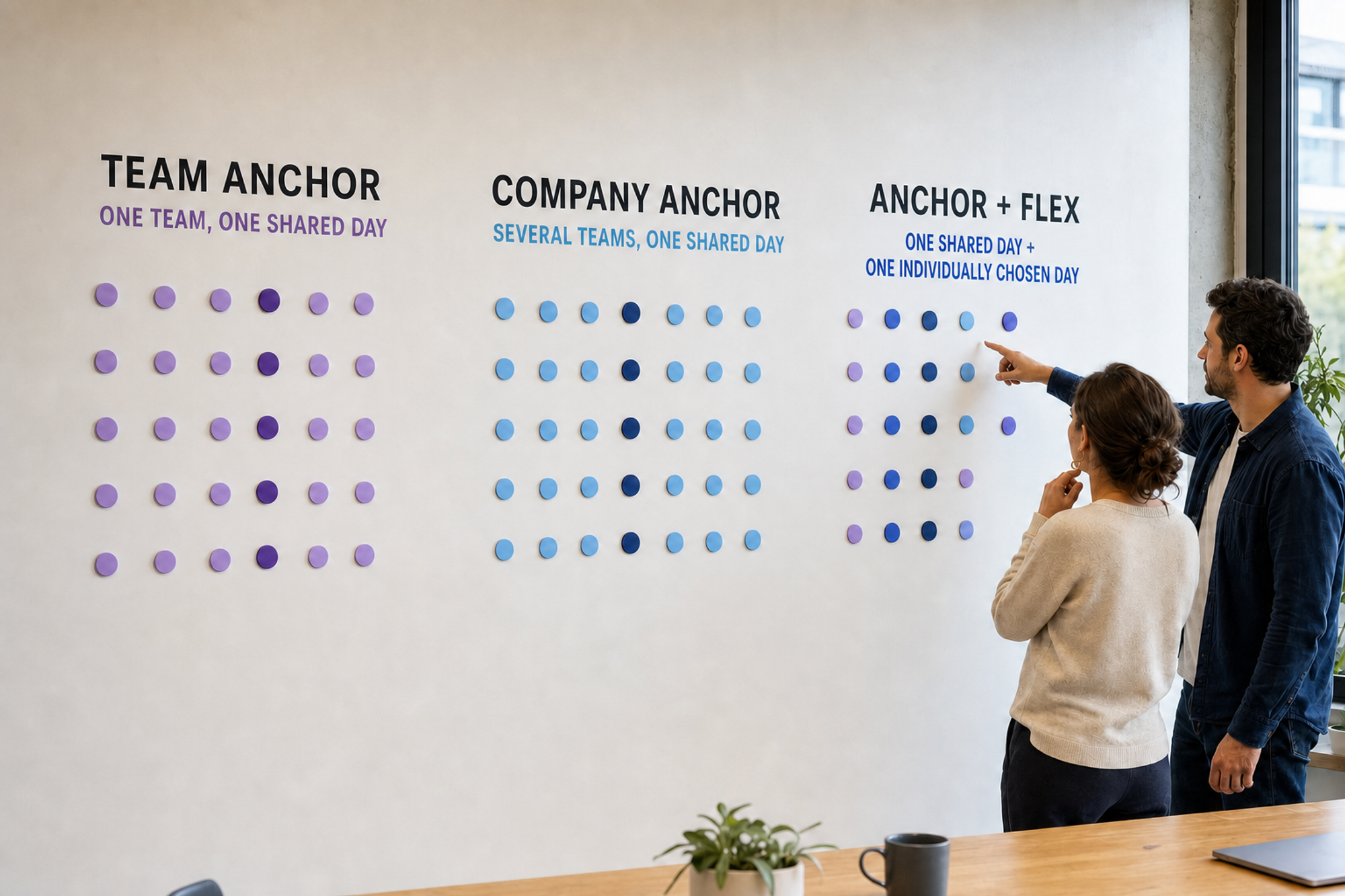
The diagram shows the distinction in plain terms: a team anchor gathers one team on a shared date; a company anchor gathers several teams on one date; anchor plus flex adds a second, individually chosen office date. None of the models is automatically better. Scope, capacity, dependencies, and flexibility determine the fit.
When an anchor day is a good fit
An anchor day is most useful when the coordination problem is recurring and shared presence can address it. Microsoft Research advises teams to spend at least some office days with close collaborators, while also noting that research comparing fixed and flexible scheduling systems remains limited. Its hybrid work guidance is a research synthesis, not proof that a particular weekday or attendance rule will work for every team.
Use this decision checklist before choosing a day:
- Do the same people repeatedly need to collaborate in real time?
- Can you name work that benefits from shared space, tools, or richer conversation?
- Will enough of the relevant people be able to attend together?
- Can the office support the expected peak for desks, rooms, access, and equipment?
- Can people with different working patterns participate meaningfully?
- Will fully remote colleagues and approved absences remain included in decisions?
- Can the team test the arrangement before treating it as settled?
If the answers are mostly no, fix the underlying meeting, information, or capacity problem first. A shared day should not become a substitute for clear workflows.
How to choose an anchor day
- Write a one-sentence purpose. For example: “We want a predictable weekly window for planning, design review, and mentoring.” Avoid broad claims about culture or productivity that cannot be observed.
- Choose the smallest useful group. Start with the people whose work is interdependent. A company-wide day may be unnecessary if the real coordination need sits within one team or project.
- Collect constraints separately from preferences. Ask about working patterns, caring commitments, accessibility, customer coverage, travel, and part-time schedules through an appropriate process. The hybrid work survey questions can help separate practical constraints from preferences without treating either as a vote.
- Map the overlap you need. List the collaborator pairs or groups that need shared time. Then use the office-day planning worksheet to compare candidate days transparently.
- Check the peak, not the average. Confirm that the chosen day has enough desks, meeting rooms, quiet space, equipment, and support. An average weekly occupancy figure can hide a single crowded day.
- Design the day before announcing it. Move workshops, onboarding, feedback, planning, and relationship-building into the shared window where appropriate. Protect some unstructured time. Do not fill every hour with meetings.
- Pilot, review, and adjust. Set a start date, review date, success measures, owner, and route for exceptions. Keep the first version reversible.
Copy-and-use anchor day setup checklist
Copy this into a planning document and complete it with the team:
- Purpose: The anchor day exists to [name two or three concrete outcomes].
- People in scope: [team, function, project group, or location].
- Cadence: [weekly, fortnightly, monthly, or event-based].
- Shared time: [full day or a defined collaboration window].
- Candidate date: [weekday or recurring date] based on [constraints and overlap evidence].
- Best-fit activities: [planning, workshops, mentoring, onboarding, customer work, social connection].
- Work to protect elsewhere: [focus work, distributed execution, or asynchronous review].
- Capacity check: [desks, rooms, quiet space, equipment, access, and travel].
- Inclusion plan: [how remote and absent colleagues receive materials, join relevant sessions, and see decisions].
- Exceptions: [who approves, how plans are updated, and how much notice is useful].
- Visibility: [where the weekly location plan is maintained].
- Pilot: [start date, four review points, final review date, owner, and measures].
Run a four-week pilot
The CIPD hybrid working guide recommends defining success criteria when hybrid working is introduced as a pilot or trial. Four weeks is a practical starting window for a weekly anchor day: it creates four observations without pretending to establish long-term effects. Extend the test when holidays, launches, travel, or unusual workloads make the window unrepresentative.

The illustration is a qualitative cycle, not a chart. It shows an initial scattered pattern, a planned collaboration day, capacity and remote-inclusion friction becoming visible, and a revised pattern. No result is implied; the team has to record what actually happened.
Anchor day pilot scorecard
Record the same small set of measures each week. These are operational measures for comparison, not research-validated benchmarks:
- Planned overlap: participants planning to attend divided by participants in scope, with agreed exceptions reported separately.
- Critical collaborator coverage: planned collaborator pairings that received useful shared time divided by pairings scheduled.
- Purpose completion: planned in-person activities completed divided by activities planned.
- Capacity misses: a count of times the team could not access a needed desk, room, quiet area, or piece of equipment.
- Inclusion and predictability: two short pulse questions: “Could you contribute to decisions that affected your work?” and “Could you plan the week with enough notice?” Keep the response scale unchanged across the pilot.
Review the measures together. A busy office is not automatically a successful anchor day, and a lower headcount is not automatically a failure. Compare what happened with the stated purpose.
Worked example: an eight-person product team
Consider a hypothetical eight-person product team with one fully remote member and several cross-functional partners. Its purpose is to create a reliable window for roadmap decisions, design critique, and mentoring. After mapping constraints and collaborator overlap, the team tests Wednesday with a 10 am to 3 pm collaboration window.
The team moves the roadmap review and design critique into that window, leaves individual status updates asynchronous, and keeps Friday meeting-light for focused follow-through. Materials go out before the shared day, the remote teammate joins the two sessions that affect their work, and decisions are written down afterward. Each Friday, the owner updates the scorecard and records capacity misses or avoidable scheduling changes.
This example is a planning scenario, not a claimed customer result. Its point is to connect the date to purpose, inclusion, and review.
Common anchor day failure modes
- Choosing the popular weekday without checking purpose. Preference is useful input, but it does not show which collaborators or activities need overlap.
- Creating a meeting pile-up. Back-to-back sessions can make the office day less useful than the locations people left behind.
- Ignoring peak capacity. A shared day can concentrate demand for rooms, desks, quiet areas, transit, and support.
- Using one scope for every dependency. Team-level overlap and cross-functional overlap may need different cadences.
- Leaving exceptions implicit. People need to know how holidays, leave, travel, part-time schedules, and changing operational needs affect the plan.
- Treating remote inclusion as a video link. Relevant materials, facilitation, and decision records matter as much as access to a call.
- Setting and forgetting. Projects, headcount, office capacity, and personal circumstances change. Review the arrangement on a stated rhythm.
Put the anchor day in the team agreement and weekly plan
A stable anchor day belongs in the hybrid work team agreement alongside its purpose, scope, exceptions, communication norms, and review date. The weekly plan should then show who expects to attend and any changes. This separates the durable rule from the current week.
Be careful with policy language. The WRC source above is authoritative within its Irish context, but requirements differ by jurisdiction, employment arrangement, and individual circumstances. Use appropriate People, legal, and employee-representative processes before making attendance rules contractual or mandatory.
Make the weekly plan visible in Slack
Officedays posts a weekly office-attendance message in Slack and lets teammates update the weekdays they plan to attend. The Slack attendance tracker guide explains setup choices and a weekly operating rhythm. For exact commands, day buttons, and scheduling behaviour, use the Officedays support guide.
The tool should make the plan easier to see. The team still needs to decide why it is gathering, who needs overlap, and how it will learn from the pilot.
Sources and methodology
This article is a public-source synthesis and practical editorial framework, not original Officedays research. Sources were checked on July 23, 2026. We used official guidance, an original qualitative research report, an institutional implementation example, and research-based practitioner guidance. Definitions and recommendations vary by workplace, so the checklist is designed for adaptation rather than universal prescription.
- Workplace Relations Commission, Code of Practice for Employers and Employees: Right to Request Flexible Working and Right to Request Remote Working, published March 7, 2024. Ireland. No study sample. Used for the formal example of anchor-day terminology and the need to state fixed on-site days clearly.
- UNSW Canberra, Charles Sturt University, and Edith Cowan University, Hybrid Working: From ‘the new normal’ to ‘business as usual’, April 2024. Interviews and focus groups conducted in 2023 with more than 80 Australian Public Service managers and supervisors across 37 agencies. The report says 36% of managers discussed anchor days in detail. Used to show that anchor days appear in real management practice, not to estimate prevalence outside that sample.
- Microsoft Research, Suggestions for hybrid work, published September 9, 2021. Research synthesis with no single study sample. Used for coordination guidance, activity fit, and the explicit limitation that fixed-versus-flexible schedule evidence was still sparse.
- CIPD Flexible Working Taskforce, Hybrid Working: Practical Guidance, November 2021. Independent practitioner guidance, not government guidance and not a primary experiment. Used for pilot criteria, clarity about autonomy, ongoing review, and sharing team working patterns.
- University of California Office of the President, Future of Work announcements, January 26 and April 3, 2023. Internal institutional program announcements with no study sample. Used only as a concrete example of two common anchor days and location-specific implementation.